Why Isn't My TikTok Working? FIXING THE COMMON PROBLEMS FAST
Are you frustrated with TikTok not working the way you want it to? Do you find yourself scrolling through the app, only to realize it's frozen, unresponsive, or just plain won't load? You're not alone. Millions of users worldwide face similar issues, but fortunately, the solutions are often simple and straightforward. In this article, we'll dive into the common problems that may be causing your TikTok to malfunction and provide you with actionable tips to fix them.
TikTok has become an essential part of social media, with over a billion active users worldwide. Its addictive algorithm, catchy music, and creative features have made it a favorite among users of all ages. However, like any other social media platform, TikTok is not immune to glitches and issues. Whether you're a seasoned user or a newcomer to the app, dealing with a malfunctioning TikTok can be frustrating and disrupt your online activities.
Before we dive into the solutions, it's essential to understand the common reasons behind TikTok's malfunctions. These can be categorized into technical issues, account-related problems, and app-related concerns. By identifying the root cause of the issue, you can take targeted steps to resolve the problem and get your TikTok up and running smoothly.
Technical Issues: The Most Common Causes of TikTok Malfunctions
Technical issues are the most common cause of TikTok malfunctions. These problems can arise from various factors, including:
- Poor internet connectivity
- Overheating or faulty hardware
- Outdated app versions
- Incompatible software
- Network congestion
Some common technical issues that may affect TikTok's performance include:
Buffering and Loading Issues
TikTok's users often report experiencing buffering or loading issues, where the app takes an excessively long time to load or play videos. This problem can be caused by:
• Slow internet speeds: A slow internet connection can cause TikTok to buffer or load slowly. Check your internet speed using online tools like Speedtest.net to ensure you have a stable connection.
• Outdated software: Ensure you're running the latest version of TikTok on your device. Go to the app store, update the app, and try again.
• Network congestion: Avoid using TikTok during peak hours or when the network is congested. Try using a different network or switching to a different time of day.
App Crashes and Freezes
TikTok app crashes and freezes can be caused by:
• Overheating or faulty hardware: If your device is overheating or has faulty hardware, it can cause the app to crash or freeze. Try closing other resource-intensive apps, turn off your device, and try again.
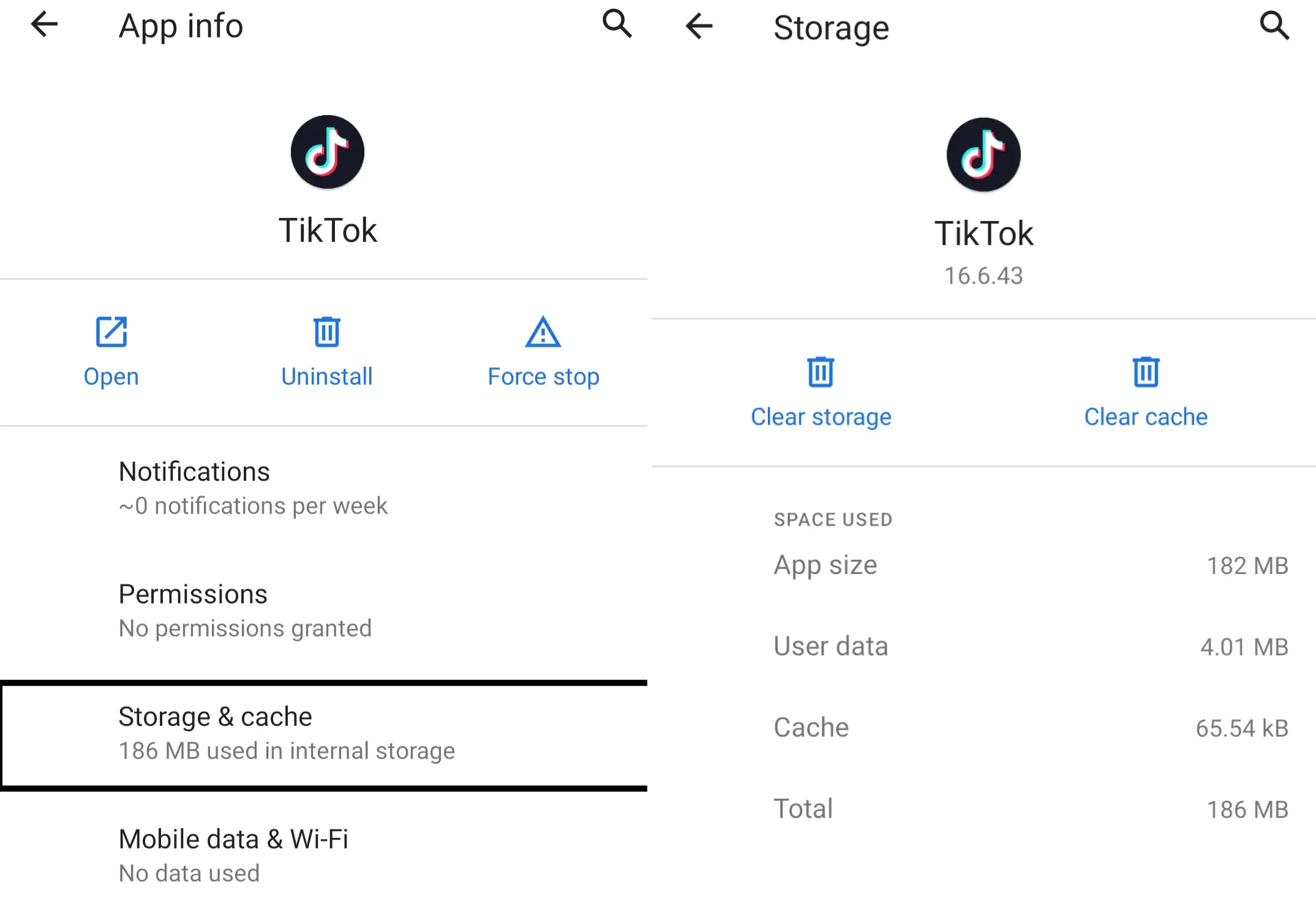
• Corrupted cache: Clearing the app's cache can resolve issues caused by corrupted data. Go to your device's settings, select TikTok, and tap "Clear cache" or "Clear data."
• Resource-intensive features: Certain features, such as high-definition video playback or live streaming, can consume a lot of resources. Try disabling these features or using a lower resolution to see if it resolves the issue.
Account-Related Problems: Resolving Issues with Your TikTok Account
Account-related problems can also cause TikTok malfunctions. These issues can arise from various factors, including:
- Password errors
- Account suspension or deletion
- Incorrect profile information
Some common account-related problems that may affect TikTok's performance include:
Password Errors
TikTok users often report experiencing password errors, where they're unable to log in or access their account. This problem can be caused by:
• Forgotten passwords: Try resetting your password using the "Forgot password" option on the login screen.
• Incorrect login credentials: Double-check your login credentials to ensure they're correct.
• Security questions: Make sure you've answered your security questions correctly.
Account Suspension or Deletion
TikTok account suspension or deletion can cause issues with your account, including:
• Loss of followers and likes: If your account is suspended or deleted, you may lose followers and likes.
• Difficulty logging in: You may experience difficulty logging in or accessing your account.
To resolve these issues, try:
• Contacting TikTok support: Reach out to TikTok's support team to request assistance with your account.
• Resetting your password: Try resetting your password using the "Forgot password" option on the login screen.
App-Related Concerns: Optimizing Your TikTok Experience
App-related concerns can also cause TikTok malfunctions. These issues can arise from various factors, including:
- Advertisements and promotional content
- Notifications and updates
- In-app purchases and subscription fees
Some common app-related problems that may affect TikTok's performance include:
Advertisements and Promotional Content
TikTok's advertisements and promotional content can cause issues with your app experience. These problems can arise from various factors, including:
• Too many ads: Too many ads can slow down your app and reduce its performance.
• Intrusive pop-ups: Intrusive pop-ups can be annoying and distracting.
To resolve these issues, try:
• Muting notifications: Mute notifications to reduce interruptions.
• Turning off ads: Consider turning off ads in the app settings.
Notifications and Updates
Notifications and updates can also cause issues with your TikTok experience. These problems can arise from various factors, including:
• Too many notifications: Too many notifications can slow down your app and reduce its performance.
• Outdated app versions: Ensure you're running the latest version of TikTok on your device.
To resolve these issues, try:
• Disabling notifications: Disable notifications to reduce interruptions.
• Updating the app: Ensure you're running the latest version of TikTok on your device.
FIX
Recent Post
Unlocking The Secrets Of Menopause: Expert Insights On Navigating Life After 40 With Paolo Tantoco
Tensions Rise As Trump Officials Defend Tariffs Amid Market Volatility And Warnings For Savers And Retirees
Rosie O'Donnell Teases Trump Move, Posts Disruptive Selfie From Abroad
Wings For The Win: Capitals Edge Ducks 7-4 In Thrilling Matchup
Ducks Fall Short: Key Takeaways From Thrilling 7-4 Loss To Capitals
Article Recommendations
- Unveiling The Enigmatic Conor Mason Bellamy: A Journey Into The Heart Of A Foreign Correspondent
- Unveiling Alma Powell's Profound Impact: A Cause For Celebration And Inspiration
- Unveiling The Secrets Of Karlan Connieenio: A Comprehensive Guide